
You can check your IGNOU Assignment Status 2026 online using your enrollment number and programme details. The Assignment Status portal shows whether your assignment has been received and processed, while assignment marks are generally checked through the IGNOU Grade Card.
For the June 2026 session, students whose assignment status or marks have not yet been updated should first check their submission status.
If the assignment was submitted successfully but the marks are still missing, contact the Study Centre before escalating the issue to the Regional Centre or IGNOU grievance portal.
👉 Check Assignment Status → Official Portal
👉 Check Grade Card → Official Portal
IGNOU Assignment Status June 2026 Overview
| What you want to check | Where to check |
|---|---|
| Submission/status | Assignment Status portal |
| Assignment marks | Grade Card |
| Marks not updated | Check submission/evaluation status first |
| Grade Card showing Not Completed | Check assignment + other required components |
How to Check IGNOU Assignment Status 2026
You can check your IGNOU assignment details by the following method.
- Open the assignment status portal.
- Enter your enrollment number.
- Select your program from the dropdown menu.
- Enter the captcha code.
- Click the “Submit” button
- Open Assignment Transmission Status .
- You will see the status of your submitted assignments.
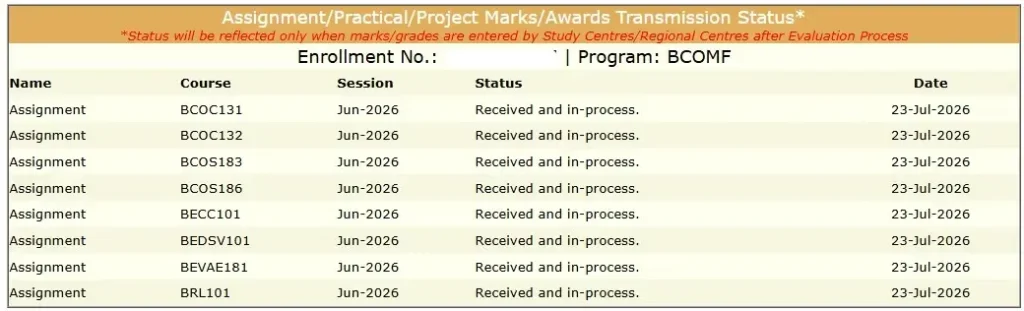
IGNOU Assignment Status Meanings
Received to be Processed
The university will process it shortly.
Received and in Process
It shows that the centre received it, and the teacher is now reviewing and evaluating it.
Check Grade Card Status for Details
The university has updated your result on the grade card.
How to Check IGNOU Assignment Marks 2026
- Open IGNOU Grade Card.
- Select your programme.
- Enter your enrollment number.
- View your assignment marks.
You will see all your academic scores here.
IGNOU assignment marks are usually available through the Grade Card after the assignments have been evaluated and the marks are uploaded by the university.
If your IGNOU Assignment Marks are not showing, check your submission status and then contact your Study Centre.
IGNOU Assignment Result 2026
Students often search for “IGNOU Assignment Result,” but assignment marks are generally viewed through the Grade Card after evaluation and processing. The Assignment Status portal is primarily useful for checking the submission/status information.
How to Check IGNOU Assignment Result
- Open the official IGNOU Grade Card portal.
- Select your programme.
- Enter your enrollment number.
- Submit the required details.
- Check the assignment marks shown for your courses.
If your assignment has been submitted but the marks are not visible, check your submission status first and then follow the troubleshooting steps below.
IGNOU Assignment Status vs Grade Card
| Feature | Assignment Status | Grade Card |
| Submission information | Yes | Not the primary purpose |
| Assignment marks | May not show final marks | Yes |
| Theory marks | No | Yes |
| Overall academic status | No | Yes |
If your assignment shows as submitted but marks aren’t visible in the Grade Card, continue below. Explore more about IGNOU University Guide 2026.
How Long Does IGNOU Take to Update Assignment Marks?
There is no single update date for every student. Assignment marks may appear at different times depending on the Study Centre, evaluation and marks-processing schedule. Therefore, two students who submitted assignments on the same date may see their marks updated on different dates.
Check IGNOU Percentage Calculator
Why Is My IGNOU Assignment Status Not Updated?
If your Grade Card is not showing your updated marks, Here are some common reasons why your assignment status or marks may not have been updated.
Assignment has not been evaluated yet
If your paper has not yet been evaluated, the marks may not appear in your Grade Card.
Marks have not been submitted/processed
If the evaluated marks have not yet been submitted or processed, they may not appear in your Grade Card.
Incorrect or Incomplete Assignment Details
Incorrect enrollment details, course codes or submission information may make it harder to identify or process an assignment correctly. Keep your submission acknowledgment and verify that the assignment details match your programme and course code.
Study Centre or submission issue
Sometimes, the Study Centre is not working anymore, so the regional office allotted a new college. Still, you submitted your TMA to the old centre, so the IGNOU Assignment Status updating process takes some time.
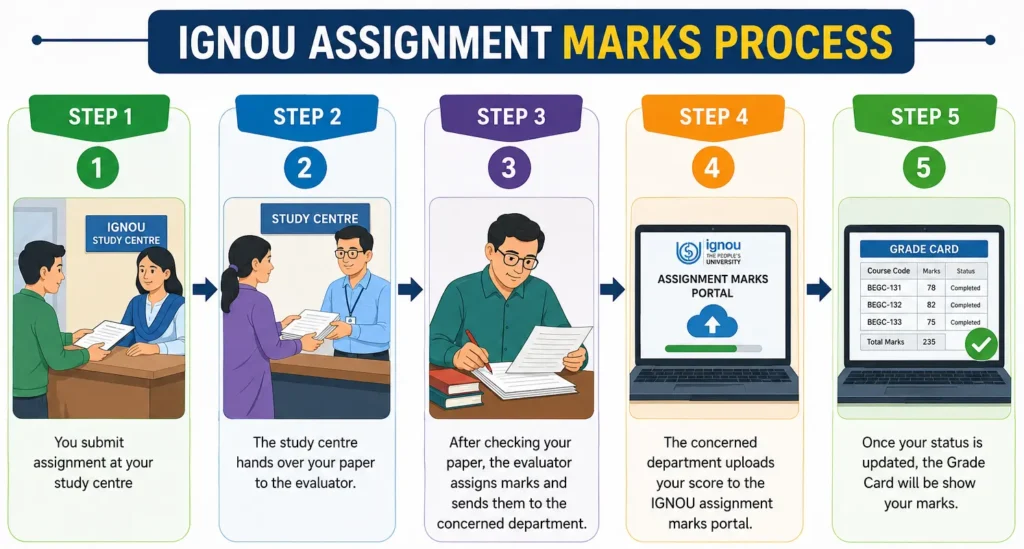
How IGNOU Assignment Evaluation and Mark Updating Works
Step 1 — Assignment submission
You submit your assignment through the applicable Study Centre or approved submission method.
Step 2 — Evaluation
The assignment is evaluated and marks are awarded.
Step 3 — Marks processing
The evaluated marks are submitted for processing through the relevant IGNOU system.
Step 4 — Grade Card update
After processing, the assignment marks may appear in your Grade Card.
What to Do If IGNOU Assignment Status Is Not Showing
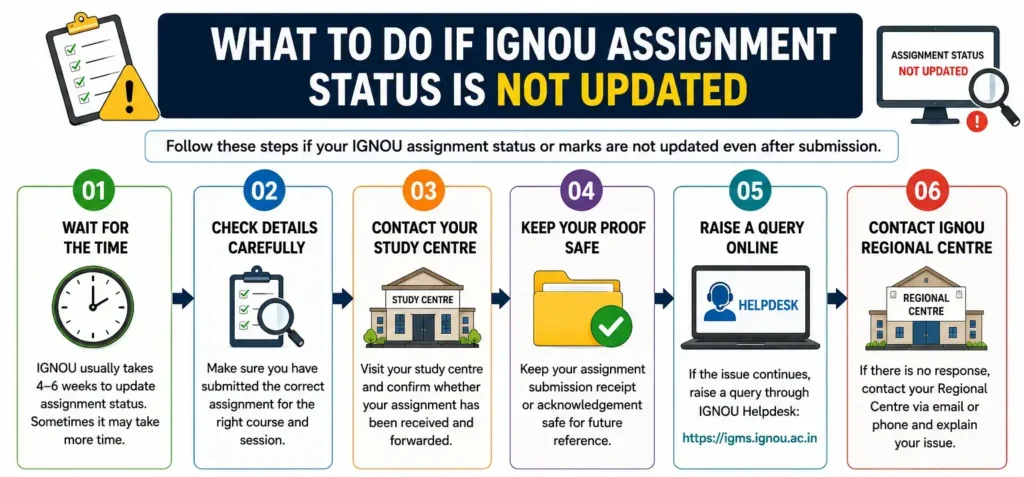
Check Your Submission Proof
First check your acknowledgement slip and track your status from official website.
Contact your Study Centre
First, visit your college and ask about the delay.
Show your Acknowledgment Slip as proof and request an update.
If possible, also visit your Regional Centre and submit an application for assignment marks not updated. If this doesn’t work, move on to the next step.
Contact your Regional Centre
Visit your Regional centre and show your submission slip as proof and request an update.
IGNOU Assignment Status Problems and Solutions
| Problem | What to check | What to do |
| Submission not showing | Submission proof | Contact Study Centre |
| Status received but marks missing | Evaluation/update | Wait/check with centre |
| Grade Card not updated | Grade Card processing | Monitor and contact centre |
| Wrong course details | Course/enrollment information | Contact relevant centre |
| Study Centre changed | Current centre/Regional Centre | Contact Regional Centre |
Submit an IGRAM grievance
You can lodge a complaint through the Grievance Portal for further assistance. If you’re not sure how to file a complaint, check out my detailed IGRAM post where I’ve explained the full process step-by-step.
Application for IGNOU Assignment Marks Not Updated
To
The Coordinator
IGNOU Study Centre ______
Subject: Request for Update of Assignment Marks
Respected Sir/Madam,
I am a student of IGNOU enrolled in the ______ programme with Enrollment Number ______.
I submitted my assignment for Course Code ______ on ______. However, the assignment marks are not yet showing on my IGNOU Grade Card.
I request you to kindly verify my assignment submission and evaluation status and take the necessary action regarding the update of my assignment marks.
I have attached my assignment submission/acknowledgment proof for reference.
Thank you.
Yours faithfully,
Name: ______
Enrollment No.: ______
Programme: ______
Course Code: ______
Submission Date: ______
Mobile No.: ______
Date: ______
Consider RTI for unresolved cases
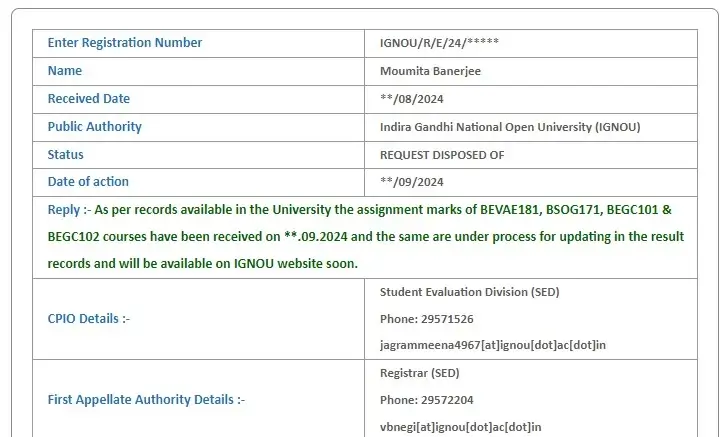
Are your marks still missing? You can apply for online RTI.
Recently, I received a WhatsApp message from Debolina, she was doing her BA English Honours course.
She had been waiting for her IGNOU assignment result for the past six months.
Even after completing all her theory papers, she couldn’t apply for her master’s course.
Do you know why?
The university has not updated her assignment marks.
Since the admission deadline had passed, she lost six months. I recommended her to apply for RTI. After submitting the application, she received her result within a month.
Real Student Cases: How Missing Assignment Marks Were Resolved
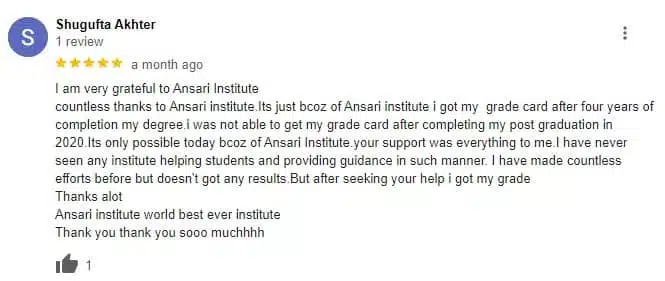
How Shugufta Got Her IGNOU Assignment Marks
Shugufta submitted her TMA four years ago, but her marks were not updated, and her admission status expired.
She contacted me for help, and I assisted her in filing an RTI. Finally, she received her result.
Here’s her feedback.
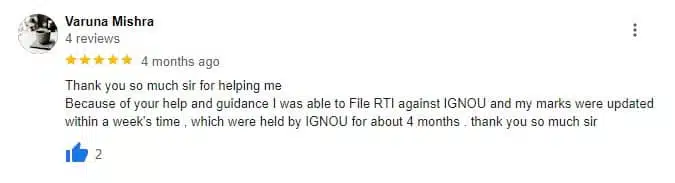
How Varuna Resolved Her Delayed Assignment Status of IGNOU
Varuna submitted her MA in Economics assignment on time but waited over 60 days without any update. She visited the study centre and sent emails but received no response.
She then contacted me, and I suggested that she file an RTI application. Within a month, the university updated Varuna’s result.
Here’s her feedback
How Shristi Updated Her IGNOU Assignment Result
Shristi submitted her BA assignment at her Study Centre on time but waited over 6 months for the marks.
She was worried because her results were not showing on the IGNOU Grade Card.
She contacted me.
I suggested she file an RTI application. Within 40 days, the university updated her Grade Card, and she received her IGNOU marksheet.
Here’s the proof.

How IGNOU Assignment Marks Affect Your Result
Assignments are an important part of the IGNOU evaluation system. They carry 30% weightage, so submitting them on time is compulsory.
| Component | Score |
| Weightage | 30% |
| Passing Marks (Bachelor’s Degree) | 35 |
| Passing Marks (Master’s Degree) | 40 |
FAQ
How to check IGNOU Assignment Status 2026 June session?
You can check your IGNOU Assignment Status 2026 by following these steps:
Visit https://isms.ignou.ac.in/changeadmdata/AdmissionStatusNew.ASP
Enter your Enrollment Number.
Select your Programme.
Enter the Captcha Code.
Click the Submit button.
Open the Assignment Submission Status link.
How to Check IGNOU Assignment Marks 2026?
You can directly check your assignment marks through the Grade Card portal.
What should I do if IGNOU has not updated my Assignment Status?
Follow these steps:
Visit your Study Centre.
Contact your Regional Centre.
Submit a complaint on IGRAM.
Apply for RTI if the issue is still unresolved.
Are IGNOU Assignments compulsory?
Yes.
You need to submit your assignment before the Examination.
If you miss, you can submit your assignment in the next session.
Conclusion
Checking your IGNOU Assignment Status 2026 is straightforward. First, check the Assignment Status portal to confirm your submission status.
If you want to check your assignment marks, use the IGNOU Grade Card.If your assignment was submitted but your marks are still missing, contact your Study Centre with your acknowledgment proof.
If the issue remains unresolved, you can escalate the matter through the Regional Centre and the appropriate grievance process.
sir apki post bhout jaldi samaj ma ayati ha